New dashboard navigation: four sections and tabs
Platform ·
The menu is down to four sections — Account, Market, Research and Learn; a section's pages open as tabs, and addresses and bookmarks stay the same.
The dashboard has grown, and the long menu no longer fit on the screen. The sidebar now has four sections. Account holds the overview, all trades, operations, the statement, and terms and accruals. Market holds charts, momentum and funding, liquidations, TradFi, the US economy, earnings, Daily Feed and Trump posts. Research holds strategies. Learn holds guides, FAQ and support. A section's pages open as tabs above the content.
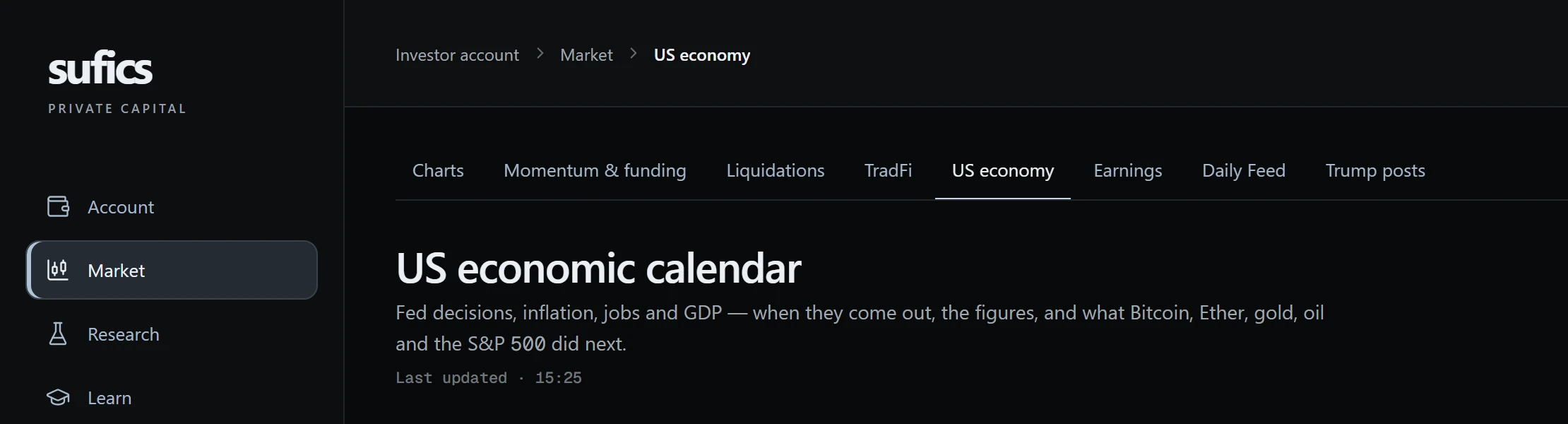
A section's item in the sidebar opens the first available tab of that section. In Account the tabs run: Overview, All trades, Trade analytics, Transactions, Statement & breakdown, and Terms & accruals. Until the account is activated, Open an account comes first. Market holds Market overview, Charts, Momentum & funding, Liquidations, TradFi, US economy, Earnings, Daily Feed and Trump posts. Learn holds Education, FAQ and Support.
Some tabs open in stages, controlled by module flags: Trade analytics, Market overview and Trump posts, and in Research, next to Strategies, the screener, rules & alerts, the event lab and the hypothesis journal. A module can be off, open to administrators, open to a pilot group, or open to everyone with full access. If a module is not open to you, its tab is missing from the menu, and a section with no open tab disappears from the sidebar. The set of items can therefore differ between users.
Your profile opens from the avatar at the bottom of the sidebar, where the support link also sits; notifications are the bell in the header. Breadcrumbs above each page show the dashboard, section and page. Page addresses have not changed, so old bookmarks and links from emails still work.
Pages outside the sections stay at their own addresses: funding the account, withdrawing funds, notifications and the profile. They have their own names in the breadcrumbs, for example Fund your account or Profile & access. A section appears in the breadcrumbs only if it has more than one tab. On a narrow screen the breadcrumbs shrink to the name of the current page so they do not crowd the header.
On narrow screens the sidebar shrinks to icons, and the section name shows in a tooltip. On a phone the menu opens from a button in the header, and the active tab scrolls itself into view in the tab strip. The header holds the notification bell, the language switcher and the logout button. At the bottom of the sidebar are support, a link to the main website and your profile with its name and email.
For keyboard users there is a Skip to content link at the start of the page: it moves focus straight to the main area, past the menu. The current section and the current tab are marked as active not only by colour but also for screen readers, and the sidebar and the tabs carry navigation labels. That keeps the menu usable without a mouse.
The news section is now called Daily Feed: as before, it carries market notes and platform announcements.
Daily Feed has two tabs: Editorial, with market notes and platform announcements, and, if the news sources module is enabled for you, Primary sources. The Daily Feed block on the overview board shows the same entries. The page sits in Market at its old address, /app/news, so the rename broke nothing.
While the account is not activated, some pages open in preview mode: they carry a lock icon in the menu, the content is blurred, and the data is cut to the first three entries. The overview, education, FAQ, support, operations, statement, accruals, profile and notifications are open even without activation. Market data in the dashboard is for reference and is not investment advice.