The platform is open: dashboard and trade reports
Platform ·
The dashboard, trade reporting and deposit/withdrawal requests are fully available.
The dashboard is open. It carries the balance with available and held amounts shown separately, trade history across all five directions, instrument charts, deposit and withdrawal requests, and the support ticket system.
The dashboard is split into four sections: Account, Market, Research and Learn. Account holds the overview, all trades, transactions, the statement and accruals. Market has charts, liquidations, TradFi, the economic calendar, the earnings calendar and news. Research carries the strategies and tools that are switched on in stages; Learn has study material, frequently asked questions and support. Because of the staged rollout, the set of tabs in a given dashboard may differ.
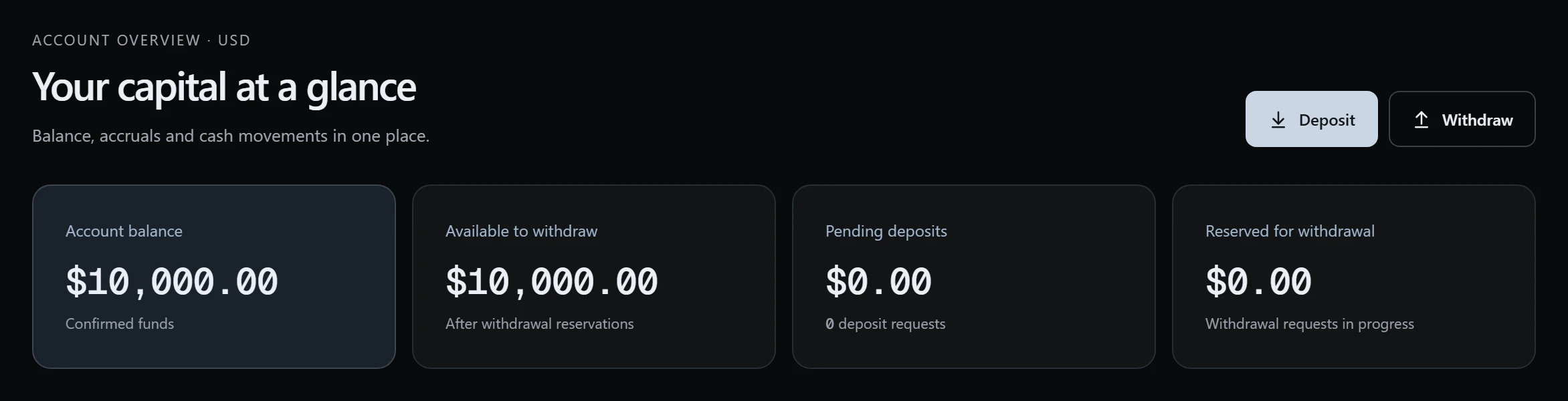
The overview shows the balance as four figures. The account balance is built only from confirmed operations. Available to withdraw is the balance minus submitted withdrawal requests, and In withdrawal requests is the amount held for them. The fourth figure is the number of deposits being processed: a deposit request has no dollar value until the transfer is checked. The hold stops two requests in a row from exceeding the account.
Deposits and withdrawals work through requests. For a deposit the dashboard shows the details for the chosen asset and network; a request and an entered transfer hash do not mean the money has arrived, as crediting follows a manual check. A withdrawal request holds the amount at once and its details cannot be changed after submission: to change the address, cancel the request and create a new one. The dashboard checks an address's format, not its owner.
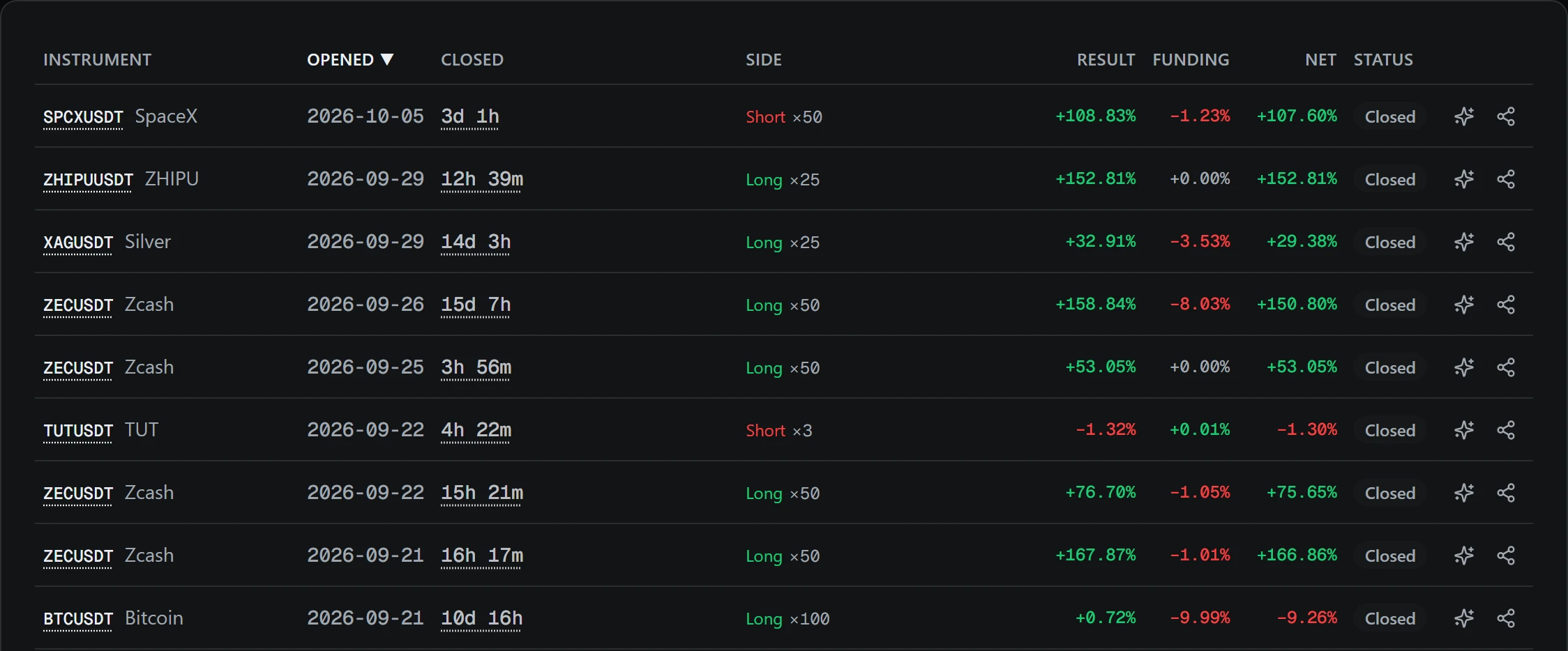
The All trades tab shows the manager's trades: a client does not open trades on the platform. The result is a percentage of the position's margin, not of the client's account; clients see no dollar amounts. Trades are pulled from the Binance API hourly. The period is a week, month, quarter, half a year or a year, and a closed trade opens to show the price path. If a position opened before the sync window, funding is not computed and a dash is shown.
The TradFi and Earnings sections have been carried over as their own tabs: non-crypto contract monitoring and an issuer earnings calendar with measured price reactions.
The Charts tab shows contract candles with the liquidation levels map and the order-flow delta. The ticker list is split into Crypto and TradFi, and favourites are stored in the database, so they match on every device. TradFi covers all non-crypto perpetual contracts on Binance USDⓈ-M, with a snapshot recomputed every minute while someone views the tab. The earnings calendar reads an hourly snapshot with dates, the earnings-per-share forecast and the measured price reaction.
Support tickets are created in the dashboard. A ticket has a subject, a category — general question, deposit, withdrawal, account and access, or technical problem — and a priority. A message can carry up to five JPEG, PNG, WebP or PDF files, up to 9 MB in total. The list shows statuses from Open to Closed and a mark for new replies; a closed ticket can be reopened.
You can sign up on your own, after which the dashboard opens in preview mode. In it the money pages — transactions, statement, withdrawal — work as usual, while the market and research sections show a small part of the data under a blur. Full access opens after an introduction: for that you need to message us on Telegram. The dashboard data describes past trades and the market and is not investment advice. Trading with leverage carries a risk of losing money.